 by
by GitHub skills are a powerful asset on any tech-focused resume, especially if you're looking for roles in software development, DevOps, or data science.
These not only demonstrate your proficiency with version control and collaborative coding but also highlight your ability to contribute to real projects. Whether you're a junior specialist or a seasoned engineer, showcasing your experience correctly can make a strong impression on hiring managers.
In this article, you'll learn which GitHub-related skills employers look for, how to phrase them effectively, and where to place them on your application for maximum impact.
What are GitHub skills?
They refer to the practical abilities and habits you demonstrate while working within GitHub’s ecosystem.
These aren’t just technical tricks - they represent how you contribute to software development in real-world settings.
Although this platform builds on Git, its value lies in how it facilitates teamwork and structured development. So when employers mention GitHub skills, they’re often thinking about more than just terminal commands.
Recruiters increasingly check candidate profiles to:
- Evaluate your coding habits and activity
- See your contributions to collaborative efforts
- Get a sense of how you organize and present your work
Even an entry-level applicant with a well-maintained profile proves readiness for team-based projects.
Create your professional Resume in 10 minutes for FREE
Build My Resume
Best GitHub resume skills
Below are some of the most valuable GitHub-related skills you can highlight in your resume.
Core Version Control
These are the building blocks of effective GitHub use. Demonstrating control over code changes, branch structures, and commits shows you're ready to work in professional development pipelines.
- Managing repositories and branches
- Merging code and resolving conflicts
- Creating and navigating commit histories
- Tagging and labeling versions for release cycles
Created and maintained multiple feature branches across several repositories, ensuring smooth code integration and version tracking.
Workflow Automation & CI/CD
Understanding automation is a major plus - especially for roles where efficiency and error reduction are key.
- Configuring GitHub Actions for test and deploy pipelines
- Integrating CI/CD tools like Jenkins, Travis CI, or CircleCI
- Writing YAML-based workflows
- Triggering automated tasks on push, pull, or schedule events
These abilities show you're not just writing code - you’re optimizing how it gets delivered.
Collaboration & Code Review
Teamwork is essential in modern development. Employers want to see that you're capable of engaging with colleagues effectively.
- Creating and managing Pull Requests
- Reviewing and commenting on peer submissions
- Employing Issues for task planning and tracking
- Participating in project discussions and documentation
Led weekly code review sessions through GitHub, providing actionable feedback and improving release stability.
Repository Organization & Documentation
Clean, accessible repos are a sign of professionalism. This skill set is especially important for positions involving open-source contributions or onboarding new team members.
- Writing detailed README files
- Using Wikis and Markdown for internal docs
- Applying consistent naming conventions and file structures
- Setting up guidelines and branch protections
Why it matters? Clear documentation reduces friction for collaborators and shows you think beyond your own code.
Analytical & Visualization Tools
While not mandatory for all roles, knowing how to extract and interpret repository data can set you apart.
- Analyzing GitHub Insights and contribution graphs
- Utilizing third-party tools to track metrics
- Monitoring pull request trends and release cycles
These competencies are especially useful in team lead, DevOps, or project coordination where visibility into workflow matters.
How to list GitHub skills in your resume?
Presenting your abilities clearly on a application can give recruiters quick insight into how you work in real-world development settings. Here's how to make that impression count:
1. Place them in the right sections
Mention GitHub-related strengths in multiple areas.
Use them in:
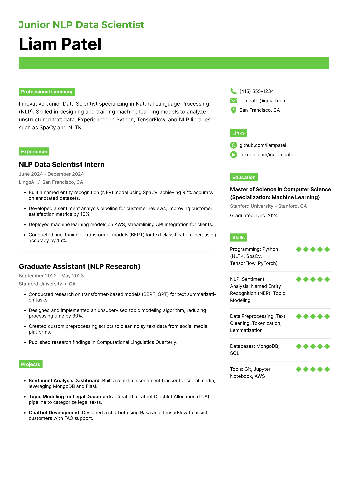
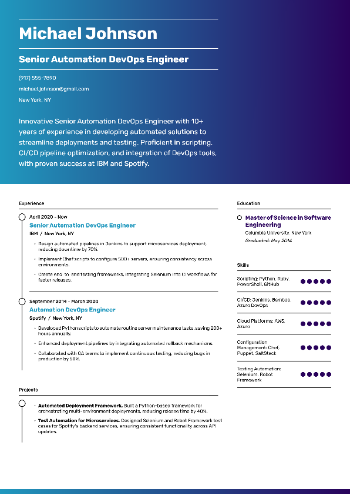
- The skills section of resume to highlight tools or processes (e.g., GitHub Actions, branch management)
- Experience entries to describe how you used this system in real projects
- A projects block if you're showcasing personal or open-source work
2. Add action-driven phrasing
Instead of simply listing “GitHub,” show how you applied it:
Implemented automated CI pipelines using GitHub Actions for a cross-functional team project.
3. Add your profile link
If your GitHub page shows thoughtful repos or consistent contributions, include it in your contact section or as a project reference.
How to learn GitHub skills for resume?
Start by Using Git
Before diving deep into learning GitHub itself, get familiar with Git - the system behind it. Understanding commands like commit, push, pull, and merge lays the groundwork for navigating repositories with ease.
- Use GitHub tutorials like Git Immersion or Learn Git Branching for interactive training
- Practice in your terminal or code editor to build muscle memory
Explore GitHub Features Gradually
Instead of trying to master everything at once, get comfortable with core features first:
- Create and clone repositories
- Open issues and submit pull requests
- Employ the Desktop app or the web interface to explore workflows visually
As your confidence grows, branch out into Actions, Pages, and Projects for automation, documentation, and planning.
Take Online GitHub Courses
Structured training help speed up your learning curve.
Some highly rated options:
- "Introduction to Git and GitHub" on Coursera (by Google)
- "GitHub Skills" (free interactive labs by the platform itself)
- Codecademy’s "Git and GitHub" track for guided practice
Choose resources that have real exercises - not just videos - so you build muscle memory as you learn.
Try Real Projects
Once you're comfortable, contribute to open-source projects or collaborate on team repositories. This helps you:
- Work with issues and discussions in context
- Practice reviewing others’ code and resolving merge conflicts
- Understand how teams structure branching strategies and pull requests
Look for beginner-friendly tags like good first issue or help wanted.
Document What You Learn
Create your own public repository to track your learning progress. Add Markdown notes, cheat sheets, and code snippets - it not only reinforces what you’ve learned but also proves initiative to potential employers.
Conclusion
Including GitHub training on your resume goes beyond listing repositories or commands - it’s about showing employers how you collaborate, contribute, and code in real work environments.
By selecting relevant abilities and supporting them with context or project examples, you demonstrate both technical expertise and initiative
Whether you’re applying for a coding bootcamp internship or a senior engineering role, clear, well-placed skills section can give your document a competitive edge and open doors to more interviews.
Create your professional Resume in 10 minutes for FREE
Build My Resume